
[ Email signatures ]
Email Signature Sample: Three That Hold Up Everywhere

A good email signature example is four to six lines: your name, your role, your business, one phone number, your website and a small logo, with social icons only for the channels you actually use. It is built as a simple table, and the logo, headshot and icons load from your own website. That last part decides whether it survives the trip to a phone.
Before writing this I read the sixteen pages ranking on page one in New South Wales for this search and its how-to cousin. Every one of them shows pretty examples. Not one mentions Gmail's character limit or what Australian law asks for, and only one says what Outlook does to your logo on the way out. I build signatures for a living, including a self-serve builder on this site, and this month my own work tripped over the phone part. So the pretty part is short here, and the part that decides whether your signature arrives in one piece gets the room.
What Is a Good Signature for an Email?
One that answers the question your reader has when they reach the bottom of your email, which is usually how do I reach this person, or what exactly do they do. Here is what earns a place, in order:
- Your name, the way people say it. "Sam Taylor", not "Samuel J. Taylor B.Bus (Hons)".
- Your role and your business, on one line if they fit. A new contact wants to know who they are dealing with.
- One phone number, written the way you want it dialled and linked so a phone can call it with a tap. Two numbers only if both are answered.
- Your email address. It looks redundant until the email is forwarded, and then it is the only way back to you.
- Your website, which is where a new contact goes to check you are real.
- Your logo, small. It is there so people recognise you, not to decorate the email.
- Social icons, only for channels you post on. The Australian Bureau of Statistics reported on 25 June 2026 that 51% of businesses used social media for their online presence in 2024-25, which means close to half did not. An icon that leads to a page last updated in 2023 does more harm than no icon at all.
Leave out the inspirational quote, the third phone number, the legal paragraph copied from a bank, and anything that only works in one email app. A signature that tries to be a brochure gets skimmed like one. If you want a review line, use your real Google score and nothing else; my article on removing bad Google reviews explains why the honest number is the only one worth printing.
Three Email Signature Examples, and What Each Gets Right
These are three of the twenty layouts in my email signature builder, shown with sample details. They look different on purpose, because they do different jobs.
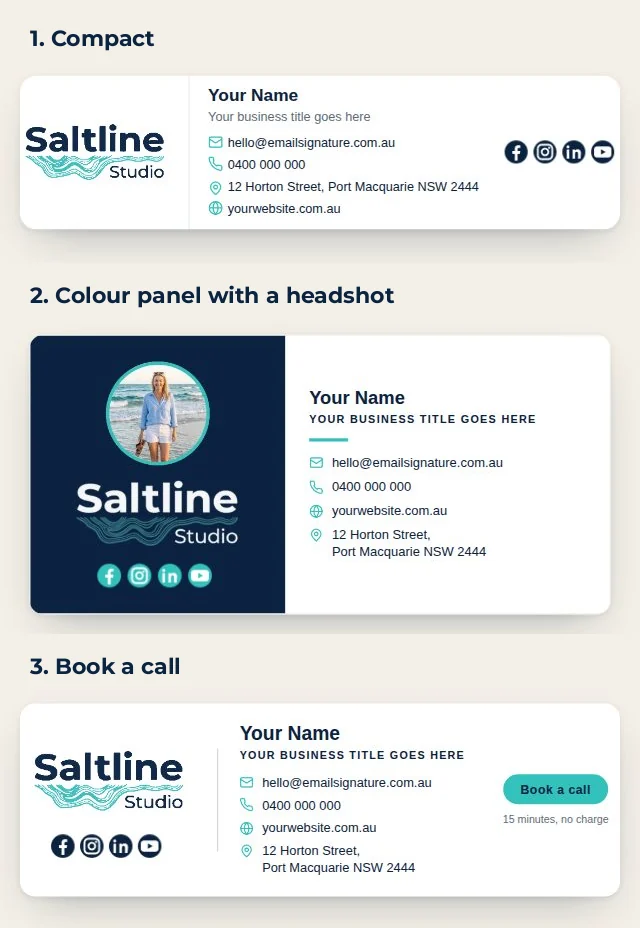
1. Compact. For anyone who mostly emails from a phone: a tradie between jobs, a bookkeeper on the road. Logo, name, the essentials and four icons. It reads in two seconds, and with the fewest parts it has the least to go wrong.
2. Colour panel with a headshot. For people whose clients choose a person rather than a company: a physio, a consultant, a celebrant. The photo does work a sentence cannot. The coloured panel only stays coloured when your brand colour is dark enough to carry white text. On a light brand colour the builder turns the panel white, because a phone in dark mode repaints coloured backgrounds and your details would sink into it.
3. Book a call. For anyone whose next step is a booking. The button is a small image with a link rather than a coded button, so no email app can restyle it, and the small line under it says what the call costs, which in this example is nothing.
The other seventeen are on the email signature builder, where you can try your own logo and colours before paying anything.
Why Do Email Signatures Break on Phones?
Because the signature you see on your screen is not the one your reader gets. Your email app rewrites it on the way out, and the reader's app rewrites it again on the way in. A lot of that reading happens on a phone. Statcounter measures web browsing rather than email, but it is the best public Australian figure there is: in September 2026, mobile was 48.57% of it against 48.48% for desktop. Four rules decide whether a signature survives both trips.
The fourth rule catches more people than you would think. Google's own Gmail help page says "You can put up to 10,000 characters in your signature," and that an image counts toward it. A logo pasted straight into the signature travels as text, and text written from a logo grows by a third. A modest 30 KB logo is 30,720 bytes, which comes out at 40,960 characters: four times Gmail's whole allowance before you have typed your name. In my own testing Gmail sometimes rescues you by storing the pasted logo itself. Outlook sent pasted-in logos and icons as separate attachments, and a Samsung phone's mail app showed them as broken boxes.
I learned the rest the hard way. On 1 October 2026 I delivered custom email signatures for NeuroInspire, and the first version looked perfect on my screen. Then an email from its founder, sent from Outlook on her Mac and opened in the Gmail app on an Android phone, arrived with both logos stretched to about twice their width. Outlook had rewritten the size rule on both logos on the way out, and the phone app then let each one fill the whole box it sat in. On my own Samsung in dark mode, the colour bar across the top lost two of its three colours, because phones repaint coloured backgrounds and leave image files alone. When I fixed the stretching by saving the logos smaller, they looked blurry on her Mac within the hour. What held in the end: the logos and icons saved at twice the size they show, each one sitting in a box exactly its own width, the colour bars made as image files, and all of it loaded from NeuroInspire's own website. Every signature I build is now made that way, including everything that comes out of the builder.
Here is how the four usual ways of making a signature compare, with the cost included, because the cost is part of the decision.
| Kind of signature | What you get | Where it goes wrong | Ongoing cost |
|---|---|---|---|
| Plain text | Your details and nothing else | Nothing breaks, but there is no logo and nothing to recognise you by | $0 |
| The whole signature as one image from Canva or Word | Looks exactly as designed on your own screen | Nothing in it can be tapped to call or email, and apps that hold back images from new senders show an empty box | $0 |
| A signature generator subscription | A designed signature and, on bigger plans, control over a whole team's signatures | Your logo, headshot and icons sit on the vendor's server, so your signature relies on a company you do not control | Monthly, for as long as you use it |
| A table, with your logo, headshot and icons on your own website | A designed signature that holds up in Gmail, Outlook and on phones | Needs a website and a login to it | $0 once it is built |
Two phone settings matter as much as the build. In the Gmail app, leave the mobile signature empty: Google's help page says that when you don't create one, new messages use the signature from your computer. The Outlook phone app works the other way. Microsoft's support team confirms on its own Q&A forum that synced signatures are not supported in the Outlook mobile app, so you set a simple one there separately.
What Legally Needs to Be in an Email Signature in Australia?
Less than the overseas pages ranking for this suggest. They talk about GDPR, SEC disclosures and UK company numbers, none of which apply to a small business in Port Macquarie. The Australian rule that matters is section 17 of the Spam Act 2003: an email that promotes your business has to clearly and accurately identify who authorised it and how to contact them, and that contact information has to stay valid for at least 30 days after you send it.
A signature with your business name, phone number and email address does that job every time you press send. Nothing in section 17 asks for an ABN or a street address. Section 18 adds an unsubscribe requirement for commercial messages, which is why every newsletter platform puts an unsubscribe link at the bottom. Whether it reaches your everyday emails depends on what they say, so if your one-to-one emails regularly push offers, read section 18 or ask someone qualified. I am not a lawyer, and this is general information, not legal advice.
What Does a Free Email Signature Generator Really Cost?
Most of the generators ranking for this are free to try and paid to keep. WiseStamp is a fair example because it publishes its prices: on 3 October 2026 its pricing page showed its Pro+ plan at $9 a month, billed annually, with team members added at $2 a month each. The page shows no currency to an Australian browser, so I have compared the numbers as printed.
For one person that is $108 a year, or $324 over three years. A team of five is $9 plus four lots of $2, which is $17 a month and $204 a year. My builder is $50 for the first person and $25 for each extra, paid once: $50 for one person, $150 for five, and your logo, headshot and icons live on your own website, so there is nothing to renew.
A subscription does buy things my builder does not. An office manager can change forty signatures at once, you get figures on who clicked what, and it can install itself across Microsoft 365. If you have dozens of staff, that is worth paying for every month. For a sole trader or a team of five it usually is not. My builder has a real limit of its own, too: it needs a website and a login to it, because that is where your logo, headshot and icons live. No website means no signature, and in that case a website is the first job anyway. My guide to what a small business website should cost is the place to start.
Build Your Own, or Have It Built
If one of the examples above is close to what you want, the email signature builder takes about ten minutes. Pick a layout, add your logo, colours and details, check the preview, pay $50, and download it with the install steps for Gmail, Apple Mail or the new Outlook. Each extra person is $25.
If your brand needs something a layout cannot do, such as a campaign line or a promotion, I design it from scratch: $250 for the first person and $50 for each extra, with three options to choose from and one round of changes. Either way, test it before you trust it. Send an email to yourself and open it on your phone, in dark mode, before your clients do.
Frequently Asked Questions
Why does my email signature look different on my phone?
What is the size of a Gmail signature?
What legally needs to be in an email signature?
What are good closing signatures for emails?

Founder & digital marketing specialist at Saltline Studio, Port Macquarie. Helping small businesses grow with custom websites and organic search.